Trip arrival estimate
Share your own expected arrival time, clearly identified as a member-entered estimate.
- Silver
- Gold
Understand Trip arrival estimate.
Share your own expected arrival time, clearly identified as a member-entered estimate.
Try it in the app
- Open Circle → Manage Circle → Safety & sharing tools.
- In Trip estimate, choose Expected arrival from now, then Save estimate.
- Choose Mark arrived when appropriate, or Stop estimate to stop publishing it.
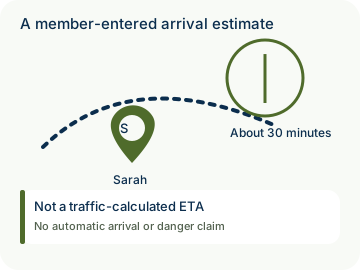
Example: Sarah expects to arrive at a meeting in Austin in 30 minutes. The app labels the estimate as Sarah’s choice; it does not calculate traffic or a route.
- Participation is voluntary. New optional collection or sharing for an under-13 member needs their actual parent’s authorization covering those purposes; an administrator role alone is not parental authority. Existing privacy rights and ordinary sharing choices remain separate.
- Private by design: the optional estimate travels in a separate end-to-end encrypted context capsule, apart from routine location/history and SOS. It expires within 24 hours; received copies cannot be recalled. Updates depend on a permitted report and connection, so Save alone does not prove recipient delivery.

How to use Trip arrival estimate
Illustrative walkthrough. Fictional examples, not a live app, real locations or a safety test. These controls never change your account, contact anyone, send an SOS, request location or make a network request.
- Where to open it
- Circle → Manage Circle → Safety & sharing tools
- What else is required
- Choose Expected arrival from now and Save estimate. Use Mark arrived or Stop estimate as needed.
Enter your expectation
Sarah chooses 30 minutes before a meeting in Austin. The app does not calculate a route or traffic.
Sarah’s estimate: About 30 minutes
Share optional context
A permitted report may carry the encrypted estimate to eligible members. Saving locally does not prove delivery.
Estimate type: Member-entered
Update deliberately
Sarah can tap Mark arrived or Stop estimate. The context expires within 24 hours; received copies cannot be recalled.
Your controls: Mark arrived • Stop estimate
Stage 1 of 3. Paused.
Reduced motion is enabled. Use the stage buttons to explore at your own pace.