Private Safety tools shortcut
Open the guarded Safety & sharing tools screen from a generic Android shortcut or widget.
- Free
- Silver
- Gold
Understand Private Safety tools shortcut.
Open the guarded Safety & sharing tools screen from a generic Android shortcut or widget.
Try it in the app
- Use your Android launcher’s shortcut or widget controls to find KinFara’s Safety tools.
- Add or choose Safety tools. The shortcut opens the same guarded app screen.
- Unlock and complete any required account, Circle or consent steps before taking an action.
Example: Sarah adds the Safety tools widget to her Android home screen. It shows a generic entry button, not a member name, location, timer or private status.
- Participation is voluntary. New optional collection or sharing for an under-13 member needs their actual parent’s authorization covering those purposes; an administrator role alone is not parental authority. Existing privacy rights and ordinary sharing choices remain separate.
- Private by design: the shortcut and widget contain no member or Circle identifiers and do not share location, start SOS, accept a request or start a timer. Launcher setup varies. This shortcut and widget implementation is Android-only; no iPhone widget availability is claimed.
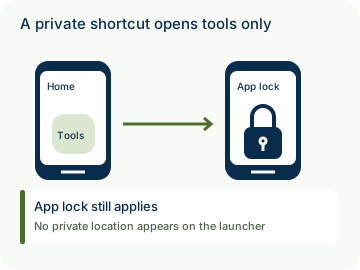

How to use Private Safety tools shortcut
Illustrative walkthrough. Fictional examples, not a live app, real locations or a safety test. These controls never change your account, contact anyone, send an SOS, request location or make a network request.
- Where to open it
- Android home-screen Safety tools shortcut or widget
- What else is required
- Add the generic entry using your launcher. Unlock and pass normal app gates before taking any action.
Add a generic entry
Sarah finds Safety tools using her Android launcher’s widget or shortcut controls.
Home screen: Safety tools
Open the guarded app
The entry carries no member, Circle, location or timer details. Account and app-lock gates still apply.
Action: Open only
Choose inside the app
Starting a check, requesting location or changing sharing still requires the explicit in-app action. No iPhone widget is claimed.
Privacy: No automatic action
Stage 1 of 3. Paused.
Reduced motion is enabled. Use the stage buttons to explore at your own pace.