Location requests
Ask a member’s phone for one fresh location with Find them now.
- Free
- Silver
- Gold
Understand Location requests.
Ask a member’s phone for one fresh location with Find them now.
Try it in the app
- Tap a member on the Map or in Circle, then choose Find them now.
- While that member shares their location with the Circle, their phone answers with one fresh location without asking them. The app then says Asked their phone for a fresh location, or Their location is already up to date.
- If it says Too many requests. Try again in a minute. or Couldn't reach their phone right now, try again later.
- Each member’s Allow location requests switch (Circle → Manage Circle → Safety & sharing tools) lets Circle members send them location requests and check-in nudges. It never turns on location sharing.
- To ask a member to check in instead, send a check-in nudge (see Nudge).
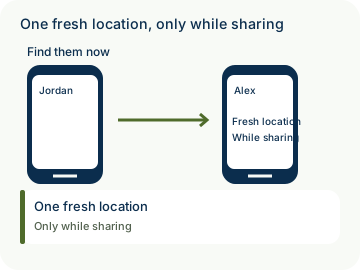
Example: While Alex shares location with Weekend friends, Jordan opens Alex’s details in Denver and chooses Find them now. Jordan reads the app’s result; an unsuccessful request is not a fresh location.
- Participation is voluntary. New optional collection or sharing for an under-13 member needs their actual parent’s authorization covering those purposes; an administrator role alone is not parental authority. Existing privacy rights and ordinary sharing choices remain separate.
- Private by design: the relay can read the request, its state and routing audience. A request contains no location and does not bypass consent or turn on location sharing. The answer is the member’s end-to-end encrypted location, only while they share their location with the Circle. A request or its acceptance is not proof that a fresh location was received.

How to use Location requests
Illustrative walkthrough. Fictional examples, not a live app, real locations or a safety test. These controls never change your account, contact anyone, send an SOS, request location or make a network request.
- Where to open it
- Map or Circle → member → Find them now
- What else is required
- Choose Find them now to ask a member’s phone for one fresh location. While that member shares their location with the Circle, their phone answers without asking them. Allow location requests in Circle → Manage Circle → Safety & sharing tools lets Circle members send location requests and check-in nudges; it never turns on location sharing. To ask a member to check in instead, see Nudge.
Request one fresh location
Jordan opens Alex’s details from Map or Circle and chooses Find them now. The request contains no location.
Jordan: Find them now
Read the result
The app says Asked their phone for a fresh location, or Their location is already up to date. The answer is Alex’s end-to-end encrypted location, only while Alex shares with the Circle.
Result: Read the app’s result
Respect the limits
If the app says Too many requests. Try again in a minute. or Couldn't reach their phone right now, try again later. Delivery is not guaranteed. A request never turns on location sharing.
Sharing: Only while sharing
Stage 1 of 3. Paused.
Reduced motion is enabled. Use the stage buttons to explore at your own pace.