Find a Place
Filter saved Places on this phone or search for a US address or Place with TomTom. Manual pin placement remains available.
- Free
- Silver
- Gold
Understand Find a Place.
Open Map → Search, or Map → Places → Add a Place → Find an address or Place. Type a US address or Place, tap Search with TomTom, choose a result, review its pin and radius, then save. Map → Places → Search saved Places filters saved names on this phone without an address request. Manual pin placement remains available. When you tap Search with TomTom, your search text and internet address go to TomTom. Under-13 online search requires the updated parent notice and consent. A search result does not establish that someone has arrived or that a location is safe.
Try it in the app
- Open Map → Search, or Map → Places → Add a Place → Find an address or Place.
- Type a US address or Place, tap Search with TomTom and choose a result. Review the map pin and radius before saving. Detection, delivery and timing of arrival or departure alerts are not guaranteed.
- Use Map → Places → Search saved Places to filter saved names on this phone without an address request. Manual pin placement remains available.
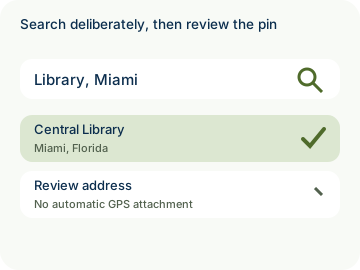
Example: Alex searches for a library in Miami, checks the suggested pin and saves it as Library.
- Location sharing is consent-based. See the rules for children under 13.
- Private by design: filtering saved Places stays on your phone. When you tap Search with TomTom, a deliberate online US address/Place search sends the submitted text and your IP address to TomTom; the app does not attach your GPS position or account, device, Circle or member identifiers. Search text is not uploaded to Kinfara. Under-13 online search requires the updated parent notice and consent.

How to use Find a Place
Illustrative walkthrough. Fictional examples, not a live app, real locations or a safety test. These controls never change your account, contact anyone, send an SOS, request location or make a network request.
- Where to open it
- Map → Places → Search saved Places; Map → Search for a new US address or Place
- What else is required
- Manual pin placement remains available. Use Search saved Places to filter locally. For online search, open Map → Search, or Map → Places → Add a Place → Find an address or Place; type a US address or Place, tap Search with TomTom, choose a result, review its pin and radius, then save. Under-13 online search requires updated parental consent.
Filter saved Places locally
Alex opens Map → Places and types Library into Search saved Places. This filters saved names on this phone without an address request. Manual pin placement remains available.
Local filter: Search saved Places
Submit online deliberately
Alex opens Map → Search and types Library, Miami. When Alex taps Search with TomTom, the submitted text and IP address go to TomTom. It does not attach GPS or account, device, Circle or member identifiers.
Online query: Search with TomTom
Review before saving
Alex chooses an online result and reviews its pin and radius before saving. Search text is not uploaded to Kinfara and a search result does not establish that someone has arrived or that a location is safe.
Search result: Review map pin
Stage 1 of 3. Paused.
Reduced motion is enabled. Use the stage buttons to explore at your own pace.