Share with people you choose
Gold: while your sharing is off for the Circle, share your location with just the Circle members you pick, up to 98 people (the choice is for adults 18 and older). It is end-to-end encrypted: only their phones can read it. Your SOS goes to everyone in the Circle unless you choose otherwise. If none of the people you chose has a phone that can receive it, your SOS alert goes to everyone in the Circle.
- Gold
Understand Share with people you choose.
Share your location with chosen members of one Circle. This is available only to adults 18 and older in a Gold Circle; a member under 18 never sees the choice. It works only while your sharing is off for the Circle. You can choose up to 98 people in that Circle. Your chosen-sharing location is end-to-end encrypted: only the chosen people's phones can read it. The server never sees a key or a position for chosen sharing. Removing a person stops future chosen sharing with them in this Circle. Information already received may remain. By default, your SOS goes to everyone in the Circle. While chosen sharing is on, Your SOS goes to lets you keep Everyone in the Circle (recommended) or select Only the people you chose. With the second option, only the people you chose receive your SOS and its location. If none of the people you chose has a phone that can receive it, your SOS alert goes to everyone in the Circle. When Gold ends, chosen sharing stops, your location stays off and your SOS goes to everyone in the Circle again. You receive a one-time notice.
Try it in the app
- In a Gold Circle, while your sharing is off for the Circle, open Settings → Who can see me and tap Only people I choose. This choice is for adults 18 and older.
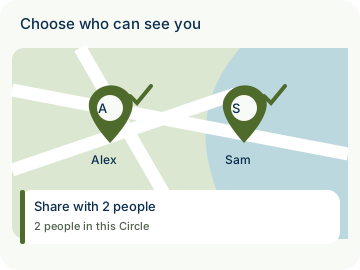
- Under Choose who can see you, check up to 98 members of this Circle.
- Tap Share with N people, where N is the number you checked: for two, Share with 2 people; for one, Share with 1 person.
- Optionally, under Your SOS goes to, choose Everyone in the Circle (recommended), the default, or Only the people you chose. The second option sends your SOS and its location only to the people you chose. If none of the people you chose has a phone that can receive it, your SOS alert goes to everyone in the Circle.
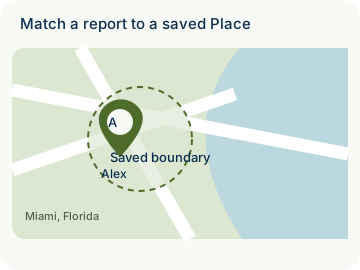
Example: Emma, an adult, has her sharing off for Home Circle, a Gold Circle. She chooses two members, Alex and Sam, and taps Share with 2 people. Her SOS still goes to everyone in Home Circle by default.
- Sharing is consent-based; the choice is not available on the account of a member under 18.
- Private by design: your chosen-sharing location is end-to-end encrypted; only the chosen people's phones can read it. The server never sees a key or a position for chosen sharing.
How to use Share with people you choose
Illustrative walkthrough. Fictional examples, not a live app, real locations or a safety test. These controls never change your account, contact anyone, send an SOS, request location or make a network request.
- Where to open it
- Settings → Who can see me (while your sharing is off)
- What else is required
- For adults 18 and older in a Gold Circle, while your sharing is off for the Circle. Choose up to 98 Circle members. Your SOS goes to everyone in the Circle by default.
Open the choice
In Settings → Who can see me, tap Only people I choose. A member under 18 never sees this choice.
Only people I choose: Gold · Adults 18+
Choose people and save
Under Choose who can see you, check up to 98 members of this Circle. Tap Share with N people, where N is the number checked: Share with 2 people for two, or Share with 1 person for one.
Choose who can see you: Share with 2 people
Review the SOS choice
Optionally, under Your SOS goes to, keep Everyone in the Circle (recommended), the default, or select Only the people you chose. The second option sends your SOS and its location only to those people. If none of the people you chose has a phone that can receive it, your SOS alert goes to everyone in the Circle. A chosen viewer sees Shared with you on the map.
Your SOS goes to: Everyone in the Circle (recommended)
Stage 1 of 3. Paused.
Reduced motion is enabled. Use the stage buttons to explore at your own pace.