Call or text your Circle
Open Call or Text for a member who shares a usable number with this Circle; confirm before opening your phone app.
- Free
- Silver
- Gold
Understand Call or text your Circle.
The person whose number it is chooses whether to share it with the current Circle. A shortcut opens your phone's dialer or message composer after confirmation; you decide what to do there. It is not emergency dispatch and never automatically calls 911.
Try it in the app
- A member at least 13 years old can open Circle → Manage Circle → Call & text details and choose whether this Circle receives their number.
- Set a display name first if the app asks, then save the number and this Circle’s sharing choice.
- Open that member’s details from Circle or Map. Call and Text are available only when a usable number has been shared.
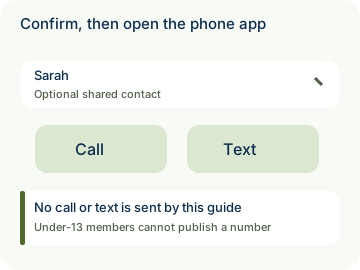
- Confirm before opening the phone app, then choose whether to place the call or send the message there.
Example: Sarah shares her number with Weekend friends. Alex opens Sarah’s details and chooses Text to arrange a meeting.
- Sharing a phone number is optional for each Circle. Under-13 members cannot publish a number through this feature.
- Private by design: the shared number travels end-to-end encrypted. Kinfara does not place the call or send the text, and does not attach a location or message text. Your phone app and carrier handle the call or message under their own terms.

How to use Call or text your Circle
Illustrative walkthrough. Fictional examples, not a live app, real locations or a safety test. These controls never change your account, contact anyone, send an SOS, request location or make a network request.
- Where to open it
- Circle → member; sharing your number: Circle → Manage Circle → Call & text details
- What else is required
- The member must opt in to sharing a usable number with this Circle. Confirm opening the phone app, then choose to call or send there.
A member shares their own number
Sarah, aged 13 or older, opts in for Weekend friends. Under-13 members cannot publish a number.
Shared contact: Sarah
Choose Call or Text
Alex opens Sarah’s details and deliberately selects a shortcut. It is available only for a usable shared number.
Member details: Call • Text
Confirm the external handoff
The dialer or composer opens after confirmation. Kinfara does not place the call or send the text, and does not attach a location or message text.
Phone app: Your final action
Stage 1 of 3. Paused.
Reduced motion is enabled. Use the stage buttons to explore at your own pace.